A pixel clock that shows how much Claude I have left
256 pixels were the easy part. The hard parts were an OAuth refresh that can lock you out of your own account, and a firmware whose app-lifetime rules had to be measured rather than read.
On my desk there is a Ulanzi TC001 — a little pixel clock with a 32 × 8 RGB matrix running the AWTRIX 3 firmware. It shows the time. I wanted it to also show how much of my Claude usage window I had left, so I would stop opening a terminal to check.
Two hundred and fifty-six pixels turned out to be the easy part. The hard parts were an OAuth refresh that can lock you out of your own account, and a firmware whose app-lifetime rules are not documented anywhere I could find.
What the panel says
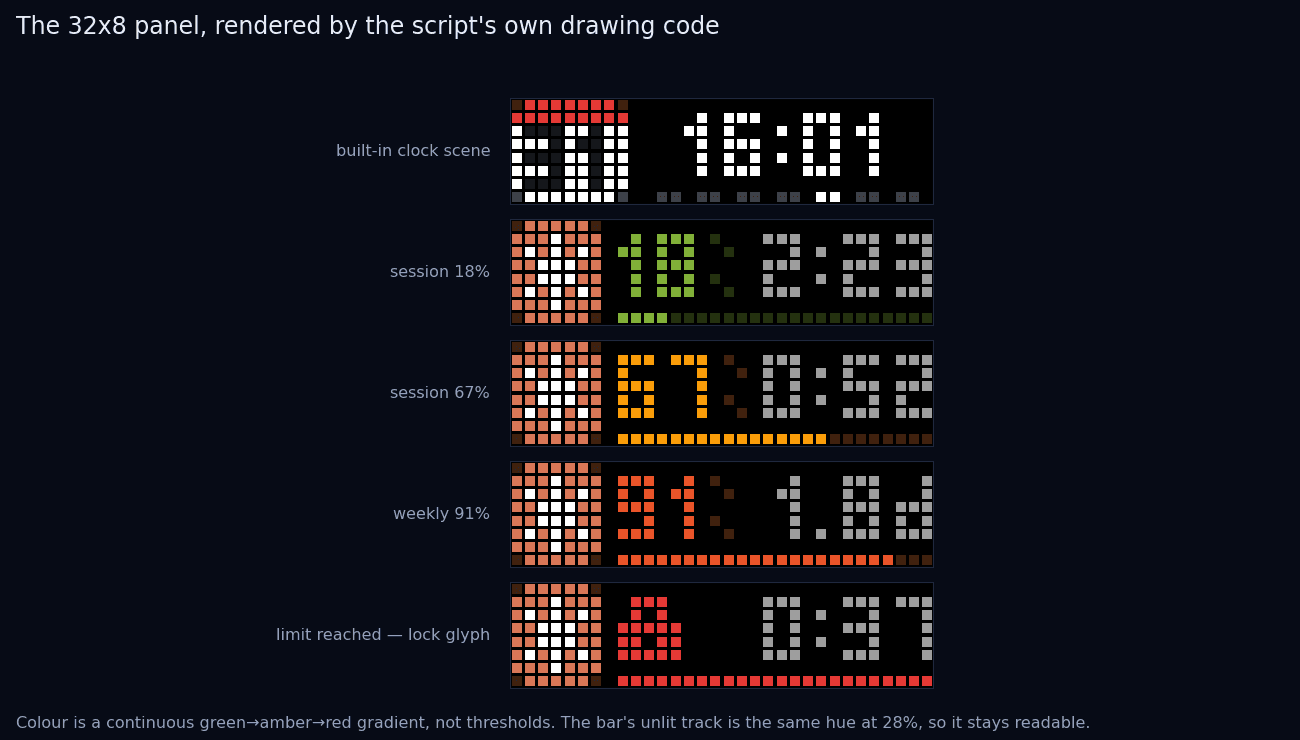
Everything is drawn by hand into a 256-entry pixel buffer, including a 3 × 5 font, because at eight pixels tall there is no room for anything else. The layout is a 7-pixel icon on the left, then the percentage, then the countdown to reset, with a progress bar along the bottom row.
Colour runs as a continuous gradient — green through amber to red across 0–100% — rather than switching at thresholds. Thresholds make a display that is either "fine" or "alarming"; a gradient lets you notice the drift at a glance without ever being startled. At 100% the number is replaced by a lock glyph and the bar fills solid red.
The one genuinely fiddly bit is that things stop fitting. Twenty-four columns
have to hold a percentage, a percent sign, and a countdown like 2:23. So the
layout degrades in a fixed order: first the ~ that marks an estimated value
goes, then the percent sign, and only then the countdown. Something always fits.
The refresh token that locks you out
The percentages come from the same OAuth usage endpoint that Claude Code's own
/usage screen uses, with the bearer token read out of the local credentials
file. The response carries a limits array with a kind of session or
weekly_all, which is exactly what the display needs.
The token expires, so the script refreshes it. And here is the trap that cost me an evening: the refresh response contains a new refresh token, and the old one is immediately dead. If you use the response, update the display, and forget to write the new token back to disk, everything works perfectly — once. The next run presents a revoked token and cannot authenticate, and because it is a background daemon, it fails silently.
The fix is one line. Finding out that the fix was needed took considerably longer, because the failure appears an hour after the mistake, on a machine you are not looking at.
Reverse-engineering the firmware by measurement
The requirement that made this interesting: if the script dies, the clock must notice and go back to showing the time. A frozen percentage from three hours ago is worse than no percentage.
AWTRIX has duration and lifetime parameters that sound like they do this.
What they actually do is not written down, so I measured it:
| behaviour | what actually happens |
|---|---|
lifetime expiry | only checked when the app is re-entered, never while it is on screen |
duration expiry | advances the loop normally |
/api/switch | resets the duration counter |
| pushing an app update | does not reset the counter |
Those four facts constrain the design completely. Set the built-in transition on with zero transition speed so the switch is invisible, give the app a duration of 90 seconds and a lifetime of 80, and switch to it at the top of every polling round.
While the script is alive, the switch keeps re-entering the app before the lifetime can be checked, so the firmware never advances and the panel simply stays put. If the script dies, nothing switches, the duration runs out, the loop falls through to the built-in clock, and on the next re-entry the stale app is deleted. Measured time from death to a correct clock: 84 seconds.
The bug that was not in the code
For a while my edits had no effect. I would change the layout, push, and the device would show the old design.
The script runs as a background daemon under pythonw from the Startup folder.
Editing the file does nothing to the process already in memory, which carries on
overwriting the panel every two minutes with the previous version of the code.
The screen was not showing a stale cache; it was showing a different program
that happened to have the same name.
- Display
- 32 x 8
- Poll interval
- 180 s
- Death to clock
- 84 s
- Font
- 3 x 5, hand-drawn
Polling settled at 180 seconds with a 30-second backoff after errors — an earlier two-second retry loop earned a string of 429s, which is a rude way to discover you have written a hostile client. Live values are cached to disk and read back for up to an hour if the endpoint has a bad moment, so a transient failure never blanks the panel.
Almost none of this was about pixels. It was about what a small always-on thing should do when the system behind it goes away — and the answer, for a device sitting on a desk pretending to be a clock, is to quietly go back to being a clock.